To complete a classic shirt or shirt dress with long sleeves, you will need to draft a shirt sleeve cuff pattern. A shirt cuff finishes the sleeve opening, controls the wrist fit, and together with a sleeve placket allows the hand to pass through the sleeve comfortably.
In this tutorial I show how to draft a classic shirt sleeve cuff pattern from scratch, how to modify the sleeve to include a slit opening, and how to draft a simple cuff suitable for elbow-length or 3/4 sleeves.
Once drafted, the cuff pattern can be reused for many shirts and easily adjusted for different sleeve styles.
What This Tutorial Will Teach You
This tutorial shows the exact drafting method I use when creating shirt patterns from scratch. The same approach works whether you are drafting an entire shirt pattern, modifying a commercial pattern, or adjusting sleeve fit on an existing garment. For a complete cuff sewing construction process, visit how to sew sleeve cuff.
Process Overview
The process for shirt sleeve cuff pattern drafting follows three main steps:
- Draft the length of the cuff
- Draw the width of the cuff
- Mark button and buttonhole placement
Anatomy of a Shirt Cuff
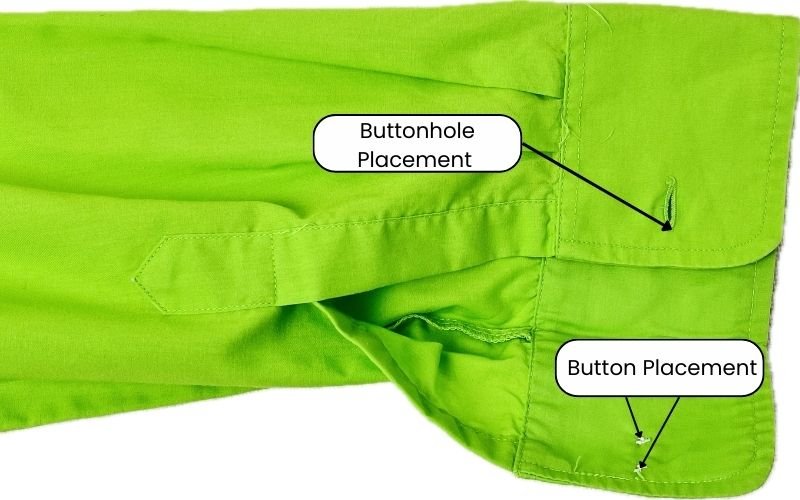
A shirt cuff pattern includes
- Cuff Piece
- Button Placement
- Buttonhole Placement
- Cuff Fold Line
While a sleeve placket (also known as sleeve slit) is not technically a part of cuff pattern, it is considered in sleeve cuff construction. The addition or lack of sleeve placket will influence the width of the cuff pattern piece.
The diagram below highlights each component on a shirt sleeve.

Why Understanding the Cuff Pattern Drafting Matters
Knowing how to draft a shirt cuff will enable you to modify the shirt patterns that you already own or add design interest to your clothing.
Tools and Measurements Needed
To draft a sleeve cuff pattern accurately, you only need a few basic pattern drafting tools. You can read more about each tool in my post on the essential pattern drafting tools.
- pattern paper
- pen or pencil
- pencil eraser
- buttons for reference
- grading ruler
To draft a shirt cuff pattern accurately you only need your sleeve pattern and the wrist measurement.
In my post on how to take accurate measurements I explain why wrist measurement is not always the exact wrist circumference, however for the sleeve cuff pattern you will need the actual wrist circumference.
Drafting the Classic Shirt Cuff Pattern (Step-by-Step)
If you prefer to follow a video guide, here is my Youtube tutorial:
Step 1 — Determine Finished Cuff Length
To draft a finished cuff length, you need your wrist measurement plus additional ease and a button overlap. I find it is easier to measure around your wrist and move the measuring tape up and down the wrist. You need to relax the tape measure to be able to move it up to the height of the desired cuff width. At the same time, the tape measure should not slide over your hand.
This measurement will be your combined wrist circumference and ease allowance.
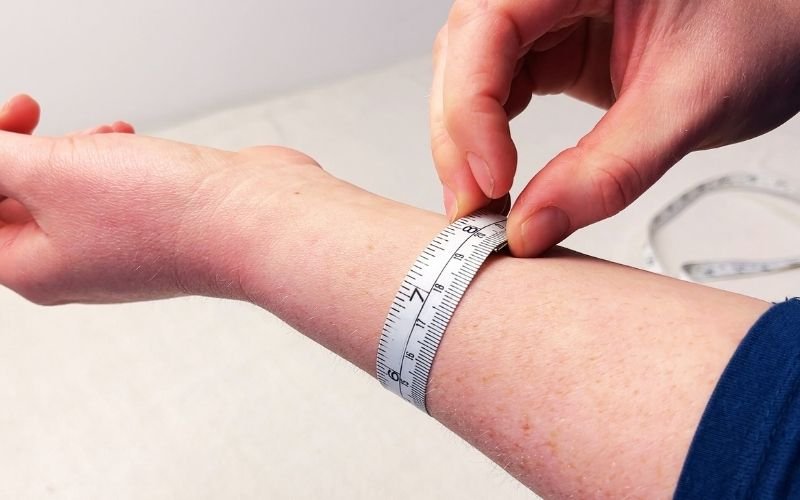
To this, you need to add a button overlap. Measure the width of the chosen button and add overlap to the cuff length that is at least twice the width of the button.
Step 2 — Draft the Cuff Rectangle
Once you have figured out the cuff length, it is time to draft the cuff.
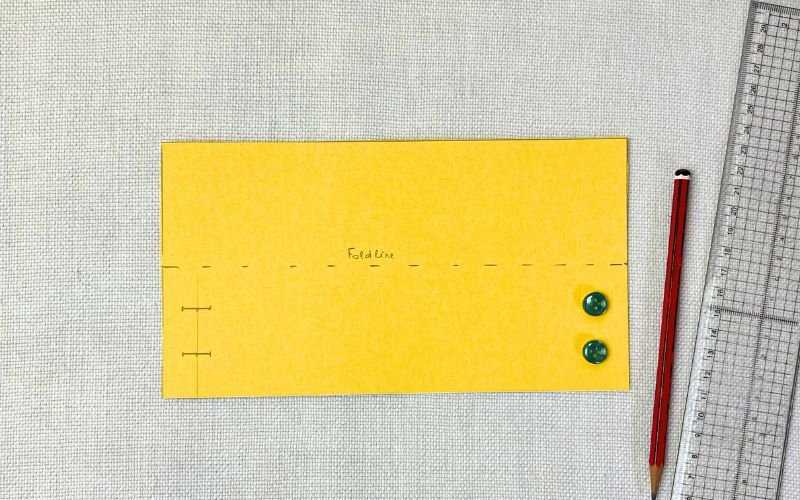
On a piece of paper, draft a cuff length that includes your wrist + ease measurement and the button extension. I am going for 22 cm cuff length that includes 3 cm button extension overlap.
Then, mark the cuff width that is twice the finished cuff width. The finished cuff can be as wide as you like, however a classic shirt cuff pattern is typically 7 cm wide. I like my cuffs slightly smaller, at around 6 cm. So the width of my cuff is 12 cm.

Mark a horizontal fold line in the middle of the cuff. This indicates where the cuff will be folded during construction and also guide the interfacing placement.

You can draft a cuff pattern that is exact width of the finished sleeve cuff, and then cut 4 cuff pieces from fabric. This can make less fabric waste as you have smaller pattern pieces to use up scrap fabrics. It also gives an opportunity to add a different fabric for inside cuff.
Step 3 — Mark Button Placement
Next you need to mark the placement for the buttons and the buttonholes. Typically there will be one button and buttonhole pair but you can add two either vertically or horizontally spaced buttons. A horizontal alignment will add an option to reduce the size of the cuff. The vertical alignment will help to maintain the cuff’s shape and function of keeping it from sliding over the hand if the sleeve is too long.

For this buttoned cuff pattern I am adding two vertically positioned buttons that are equal distance from the top and bottom and from each other, by dividing the total cuff width by 3. Place the marks for button position half width of the button overlap from the edge of the cuff.
The buttonhole position is mirrored on the other side of the cuff. The middle of the buttonhole will be the exact location of the buttons. Then square the buttonhole opening marks equal distance to either side of the middle point.

If the chosen shirt cuff overlap is too narrow, leading the buttonhole placement to be too close to the cuff’s edge, then move the buttonhole slightly inwards, giving you at least 0.5 cm gap from the edge of the cuff.
Step 4 — Add Interfacing Section
Cuffs will need to be interfaced to add a structure to the cuff and stop it from becoming too soft. You need a crisp cuff that maintains its shape without collapsing.
Therefore, as hinted in step 2, half of the cuff needs to be interfaced. You can either make another seperate pattern or make a note on the cuff pattern piece that you will need to cut an interfacing that is half width of the cuff’s measurement. The interfacing will need to be applied to the section that is on the outside.
To reduce the amount of the paper patterns, I do not make a separate pattern piece for the interfacing.
Step 5 – Add Seam Allowances and Grainline
Once you have drafted the cuff, transfer the cuff to a sturdier paper or cardboard. Many professional pattern makers keep master patterns without seam allowance so that seam allowances can be adjusted for different construction methods. You can add seam allowances at this stage but as I explained in my detailed guide on how to add seam allowances, I keep my base patterns without seam allowance.
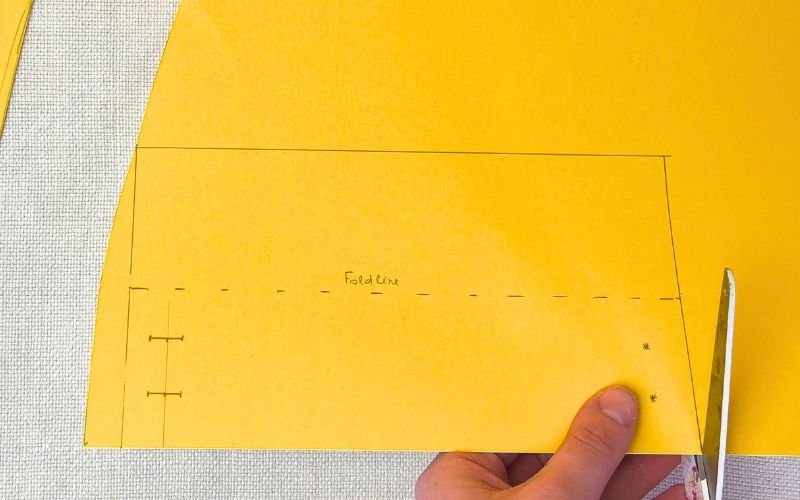
Add a straight grainline marking that is perpendicular to the cuff fold line.
Standard Shirt Cuff Measurements
While cuff proportions can vary depending on style, most classic shirt cuffs follow similar measurements. The table below provides a useful starting point when drafting cuffs for everyday shirts.
| Component | Typical Measurement |
|---|---|
| Width of the Cuff | 6 -8 cm |
| Button Overlap | 2–3 cm |
| Wearing Ease | 2–3 cm |
| Wrist Circumference | 14-20 cm – actual measurement is individual |
Modifying the Sleeve Pattern for a Cuff
To use a sleeve cuff, you will need to modify the sleeve pattern, by removing the lower section of the sleeve that is the same measurement as the cuff.
Drafting the Sleeve Slit (Placket Opening)
To use a shirt sleeve cuff, you will also need to add a sleeve slit (also referred as placket opening). Without a sleeve slit or placket, a fitted cuff would prevent the hand from passing through the sleeve.
The sleeve slit for the cuff is marked halfway between sleeve centre line and the side seam on the back portion of the sleeve after the sleeve is modified to include cuff. The slit ranges from 9-12 cm.
I will delve deeper into sleeve modification and sleeve slit in my upcoming guide on how to draft sleeve placket opening and modify sleeve pattern.
Testing the Cuff Draft Before Cutting Fabric
Even when the cuff pattern is drafted correctly, it is worth testing the draft before cutting into your final fabric.
A quick test cuff can reveal how well the cuff fits and whether the chosen button overlap is sufficient.
Method 1: Paper Test
The quickest option is to test using a pattern paper. Cut out the cuff without seam allowances and fold it over your wrist.
This will give you a quick preview of:
- the width of the cuff in relation to your arm
- whether the cuff is wide enough to be comfortable
- whether the cuff is narrow enough so that it does not slide over the hand
- the button and buttonhole aligned location
Small adjustments to the cuff pattern can easily be made at this stage.
Method 2: Muslin Test
If you are working with a new cuff pattern or unfamiliar fabric, sew a quick test cuff in scrap fabric or muslin.
This allows you to check:
- that buttons and buttonholes overlap accurately
- whether you need to include additional buttons
- whether the shape of the cuff works
a test version takes very little time but can prevent fit issues in the final garment.
Practical Tip
Fabric weight influences how a cuff behaves on the wrist. Heavier fabrics create a more structured cuff and may require slightly more ease. Lightweight fabrics often feel looser and may require less ease to maintain a neat fit.
Optional Drafting Variation
You can use the same step-by-step method to create many cuff variations.
- changing the width of the cuff and wrist ease change the appearance of the finished cuff
- create a double shirt cuff by doubling the width of the cuff and introducing additional fold line
- cut a round or angled corners on the fold line to create angled or rounded sleeve cuffs
Elastic alternative
Instead of shaping a cuff, you can extend the shirt sleeve hem to include casing for elastic for a simple elasticated sleeve cuff.
Sleeve facing
Instead of drafting a sleeve cuff, trace the lower edge of the sleeve to create a pattern for a sleeve facing. You will need to cut two pieces and sew them together before attaching to the sleeve
Frilled cuff
Draft a circle with a radius that is calculated by dividing the modified sleeve’s lower edge measurement by 6.14. Draw another circle with the same centre point and a radius that is larger than the previous by the desired cuff width.
Simple Straight cuff for elbow length or 3/4 elbow sleeve
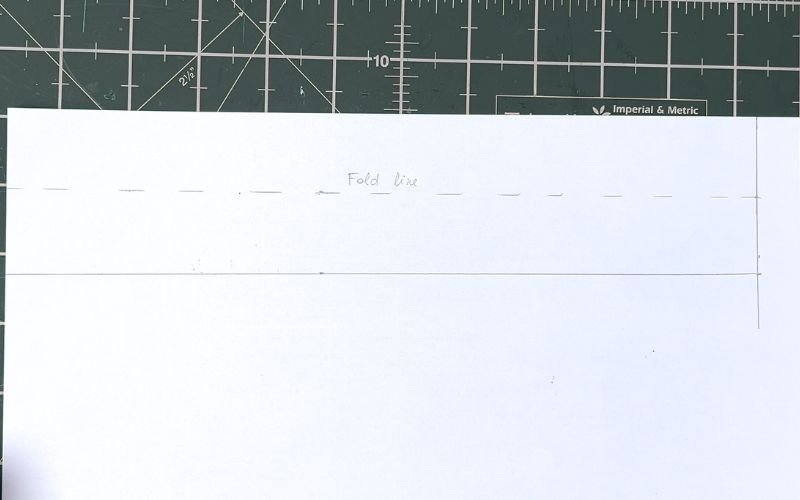
Draft a rectangle that is the length of the sleeve measurement at the elbow or 3/4 sleeve and 4-6 cm wide. Mark a fold line at the half width. You can attach this to the sleeve pattern sewn as a circle or by leaving the ends opend for more arm movement.
Common Mistakes When Drafting Shirt Cuffs
These are common cuff drafting issues that I have experienced:
- Cuff is too tight
- Cause: insufficient ease added to the chosen fabric
- Fix: add more wearing ease
- Hand does not fit through the sleeve
- Cause: The slit is too short
- Fix: Add a longer sleeve slit
- Cannot button the cuff
- Cause: The button overlap is not included
- Fix: add 2-3 cm button overlap to the length of the cuff
- The cuff does not hold its shape:
- Cause: The interfacing is not added
- Fix: add a note on the cuff pattern to include interfacing at the construction stage
How This Cuff Fits Into a Complete Shirt Pattern
The cuff is one of several structural components that form a complete shirt pattern. Once the sleeve, placket, and cuffs are drafted, the sleeve can be attached to the bodice and finished with the collar and button stand.
Shirt Pattern Drafting Series
This tutorial is part of my step-by-step shirt pattern drafting series:
- How to Draft a Basic Bodice Block
- How to Draft a Sleeve Block
- How to Draft a Button Stand
- How to Draft a Collar Stand
- How to Draft a Shirt Collar
- How to Draft a Shirt Cuff (this post)
- How to Draft a Sleeve Placket
- How to Modify Sleeve Block for a Shirt Pattern
- How to Modify Bodice Block for a Shirt Pattern
- How to Draft a Shirt Pattern From Scratch
Each guide explains one component used to create a complete custom shirt pattern.
FAQ: Cuff Drafting
Final Thoughts
Once you understand the structure of a cuff pattern, it becomes easy to adapt the design for different sleeve lengths and styles both on self drafted patterns and commercial patterns.
About the Author: Pattern Drafting & Garment Sewing

I’ve been sewing for over 30 years and drafting my own patterns for more than a decade. I work almost exclusively with self-drafted patterns, which means I don’t rely on instructions—I rely on understanding how garments fit and come together.
Most of my methods come from figuring things out through testing, adjusting, and breaking down common problem areas using logic and geometry rather than guesswork.
On this site, I share step-by-step tutorials on pattern drafting, garment construction, and sewing techniques to help you create well-fitted, professional-looking clothes from scratch.
👉 Read more about my approach to pattern drafting and sewing here: About Me